

mod
Geotagged ScreenshotsMinecraft mod for 1.20.1
Enriches screenshots with metadata like in-game coordinates to make them viewable in Xaero's World Map.
- Latest version
- 1.20.1-0.2.0
- Minecraft
- 1.19.2 to 1.20.1
- Java
- Java 17+
- Loader
- Forge
- Licence
- LGPL-3.0-only
- Downloads
- 64.3k
- Updated
- 3 y ago
- Available on
- Modrinth
 Our hosting
Host Geotagged Screenshots servers
One click and Geotagged Screenshots is installed with the right loader, on hardware built for it.
- 1.20.1
- Forge
- One click mod install
- Loader matched for you
- Ryzen CPUs
- NVMe SSD
Screenshots
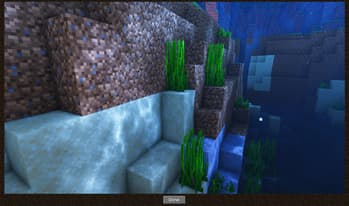
Click a screenshot to open it. Screenshots are served from the author’s own host and belong to them.
Minecraft versions
Every version Geotagged Screenshots declares support for, newest first, with the Java runtime that version needs.
Download
From Geotagged Screenshots’s own host. Nothing is re-hosted here.
Most recently published release
geotagged_screenshots-1.20.1-0.2.0.jar · 56 KB · for 1.20.1 · Forge
5552d8369f80…Frequently asked
Does Geotagged Screenshots work on Minecraft 1.20.1?
Yes. 1.20.1 is the newest Minecraft version Geotagged Screenshots declares support for, and the claim comes from the author's own release metadata rather than from a compatibility list somebody maintains by hand.
Which Minecraft versions does Geotagged Screenshots support?
Everything the author has declared, from 1.19.2 up to 1.20.1. The full list is in the table above, with the Java runtime each version needs next to it.
Do I need to install Geotagged Screenshots on the client or the server?
Both. Every player needs it installed and so does the server, so anyone joining without it will be refused.
Which platform or loader does Geotagged Screenshots support?
Forge. A build for one platform or loader will not necessarily load on another, so this is the first thing to check before the Minecraft version.
Which Java version do I need for Geotagged Screenshots?
Among the supported Minecraft releases above, the highest recorded requirement is Java 17 or newer. Use the requirement for the exact Minecraft version you run; previews and snapshots may differ.
What licence is Geotagged Screenshots under?
LGPL-3.0-only, as stated by the author on the platform we synced it from. Check the project's own page before redistributing or bundling it.
How do I install Geotagged Screenshots?
Install the matching loader first, then put the downloaded file in your mods folder and start the game. The loader, the mod and Minecraft all have to be on the same version, which is the usual reason a mod does not appear in game.
Where do I download Geotagged Screenshots safely?
Start with the author's page on Modrinth, which is where the data here is synced from. MCReference does not host or repackage files. When available, recorded download links go to the source for that release; verify the publisher, filename and any available checksum before running it.
Works on the same versions
Ordered by how much of the recent Minecraft version coverage overlaps, not by popularity.
Is this information wrong or missing something? .