
data pack
Coordinates DisplayMinecraft data pack
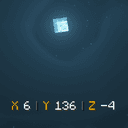
This datapack adds coordinates directly to the screen (located above the XP bar); you won't have to press F3 or deal with the fact that coordinates aren't displayed in newer versions.
- Latest version
- no release indexed
- Minecraft
- no version declared
- Licence
- not stated
- Downloads
- 305
- Updated
- 13 d ago
- Available on
- CurseForge
 Our hosting
Host Coordinates Display servers
Deploy a server with Coordinates Display already added to the world, on hardware built for it.
- One click install
- Version matched
- Automatic backups
- NVMe SSD
Frequently asked
How do I install Coordinates Display?
Data packs install per world: put the downloaded file in that world's datapacks folder and run /reload, or add it when creating the world. No loader is involved. On a server, the world folder lives next to the server jar.
Where do I download Coordinates Display safely?
MCReference has no release file or checksum recorded for Coordinates Display. Check the publisher's CurseForge listing for current downloads and verify the publisher before installing.
Which Minecraft versions does Coordinates Display work on?
The author has not declared a supported version in the metadata we sync, so there is nothing here we can state as fact. Check the project's own page before installing it, and treat an old data pack with no declared version as untested on modern Minecraft.
Is this information wrong or missing something? .